
Everybody wins with relevant alternatives in search results

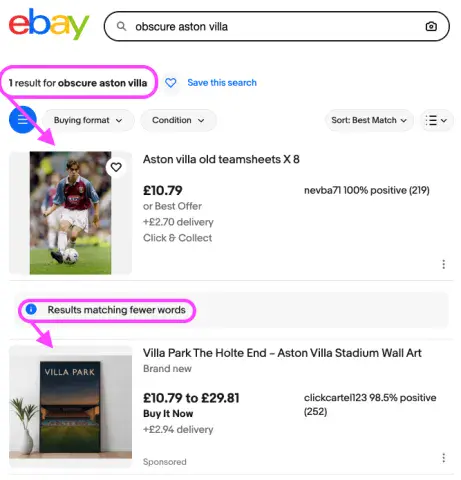
Drupal's Views module is wonderful for listing content, but what should you show when you have nothing to list? Everybody loses if a journey ends there: your visitor has to start again, and you've missed an opportunity to help them. The likes of Amazon and eBay show alternative results after more precise matches for a search, even if there are some results. Limited results mean a limited chance for your visitor to find what they want, so providing alternative suggestions increases your chance to convert them to satisfied guests.
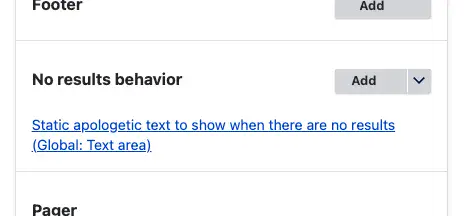
Out of the box, you can configure what to show when Drupal can't find any results (sometimes known as the 'empty text') :
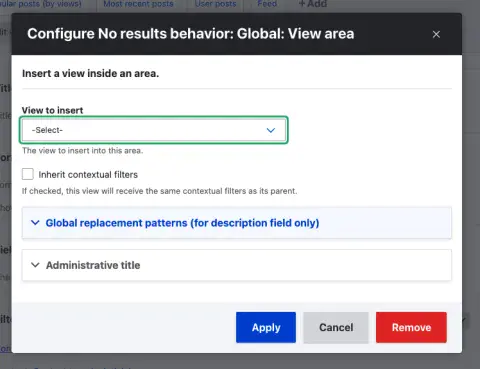
Even more usefully, you can include a views listing in this - perhaps to list alternative results with fewer active filters, to maximise the chances of showing visitors something relevant to them:
So far, so good
But I wanted to take this an extra step, to show this alternative set of results, even when the initial view has results, but not enough of them. This required two key changes with custom code, because Drupal will only build and print whatever is configured for the 'No results behaviour' when there really are no results. (Thanks, Captain Obvious! 🫡)
Override the
views-view.html.twigtemplate to replace anelseifwith distinctifblocks as follows:Before the change, this has an
elseifso when there are any results, the empty text can never show:{% if rows -%} {{ rows }} {% elseif empty -%} {{ empty }} {% endif %}After - with two distinct simple
ifblocks, so both can be output together:{% if rows -%} {{ rows }} {% endif %} {% if empty -%} {{ empty }} {% endif %}A post-render hook to build the output of that 'No results behaviour' when there are results, but fewer than a desired amount:
/**
 * Implements hook_views_post_render().
 */
function MYMODULE_views_post_render(\Drupal\views\ViewExecutableViewExecutable $view, array &$output, \Drupal\views\Plugin\views\cache\CachePluginBase $cache) {
  // Add a pre-render that will render the empty area if there are 1-3 results.
  if (
    $view->id() === 'MY_VIEW_ID' // e.g. 'products'
    && $view->current_display === 'MY_DISPLAY' // e.g. 'page_1'
    && !empty($view->result)
    && count($view->result) <= 6 // Threshold below which to show empty text.
  ) {
    $output['#pre_render'][] = function ($element) {
      /** @var \Drupal\views\ViewExecutable $view */
      $view = $element['#view'];
      // Store this instance, so that the fallback display's equivalent will be
      // able to get at what was in the results, to avoid duplicating them.
      // @see MYMODULE_views_pre_view()
      views_set_current_view($view);

      // Build the configured 'No results behaviour'.
      $element['#empty'] = $view->display_handler->renderArea('empty', FALSE);
      return $element;
    };
  }
}
This could be in a custom module or theme. I went for building the configured 'No results behaviour', but you could embed something different if, for example, you wanted to show different text for whether there were only a few results, or none at all.
Techy aside: The call to
views_set_current_view()in the code above follows a similar approach to how Attachment displays are aware of their parent display. When views begins executing the display of alternative results, the statically-stored 'current view' is added to an array stack at$view->old_view. We'll make use of that below in the 'Going further' section.
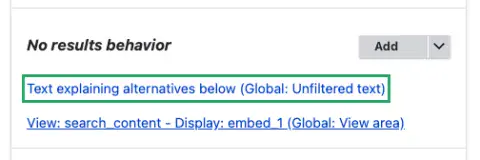
Now when a visitor makes a search on your site but doesn't get anything they like the look of, you present them with potential alternatives. I suggest including some simple text above the alternative suggestions to explain what they are (rather than exact matches for the original search), as demonstrated in the eBay screenshot above. This could just be the first thing set in the 'No results behaviour' of the view, before adding the alternative views display:
Show the right things, and everybody wins! 🏆
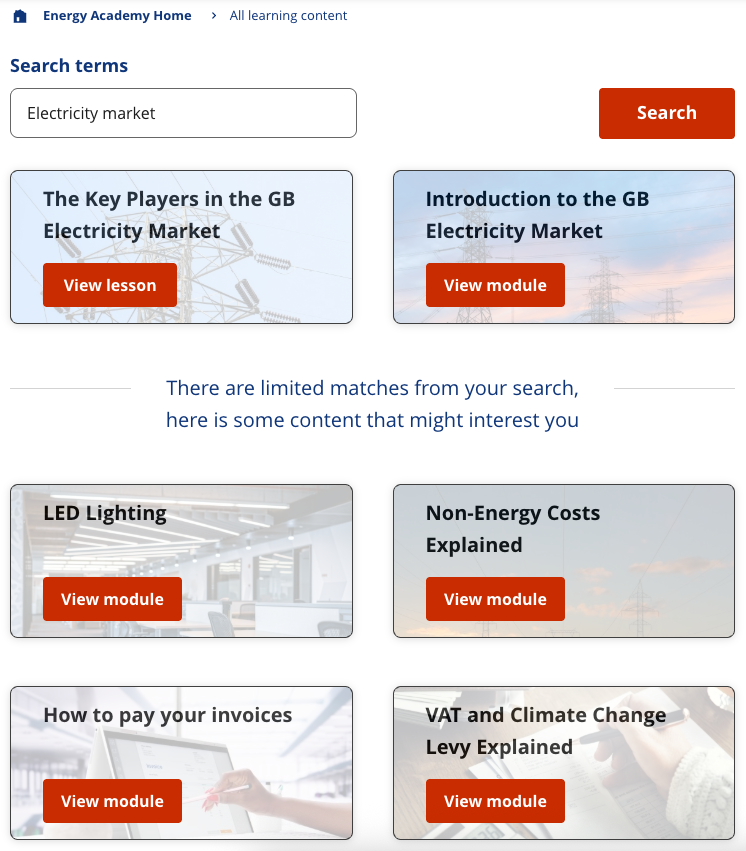
We used this idea on a learning platform where users can find content relevant to them. There are only so many lessons available, so to keep visitors engaged it's important to show useful suggestions that didn't match their keywords. The explanatory text in the 'No results behaviour' clarifies which items directly fit the search, and which are extras:
Going further
An optional extension to this idea is to deliberately exclude any results that did come back in the original set. Use a contextual filter (argument) on your view for excluding IDs and a hook_views_pre_view() to act on the alternative results views display. The contextual filter needs to be for the content IDs (or IDs of whatever kind of entity your original list is for), and have both checkboxes in the 'More' section ticked so that it excludes results.
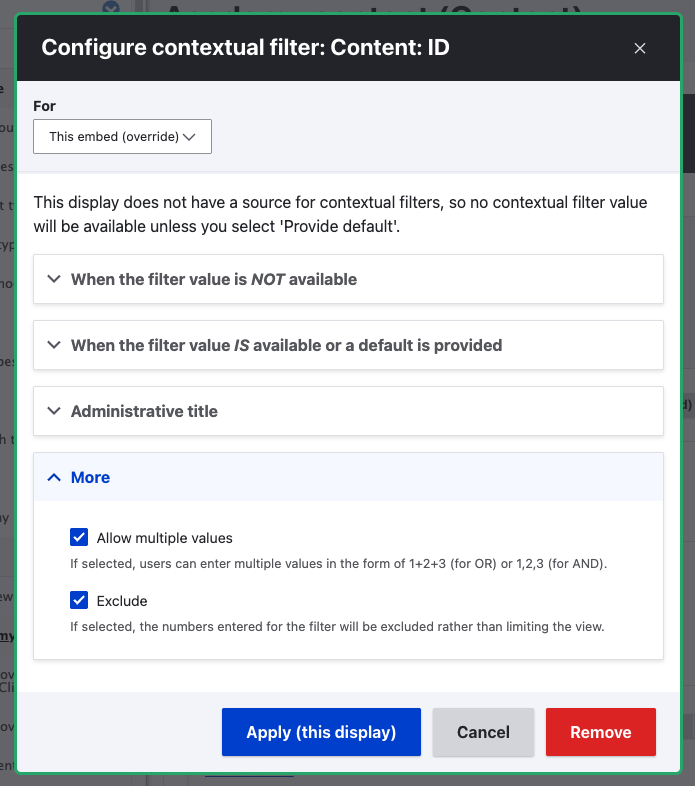
Then the hook_views_pre_view() takes the results from the original ('parent') view and populates that contextual filter with them, so that they can't show up twice. Note that this can only go in a module, not your theme:
/**
 * Implements hook_views_pre_view().
 */
function MYMODULE_views_pre_view(\Drupal\views\ViewExecutable $view, $display_id, array &$args) {
  if (
    $view->id() === 'MY_VIEW_ID'
    && $display_id === 'MY_ALTERNATIVE_DISPLAY' // e.g. 'embed_1'
  ) {
    // Parent view was set by MYMODULE_views_post_render() so that we can
    // ensure to exclude any results in the original set, from this fallback.
    $parent = end($view->old_view);
    if (
      $parent
      && $parent->id() === 'MY_VIEW_ID' // e.g. 'products'
      && $parent->current_display === 'MY_DISPLAY' // e.g. 'page_1'
      && !empty($parent->result)
    ) {
      $view->setArguments([
        // The 'nid' key should be whatever property identifies results uniquely.
        implode('+', array_column($parent->result, 'nid'))
      ]);
    }
  }
}
Finally, you might want to check that your alternative display won't just inherit the same exposed filters as your parent display. Tinker with what fits your scenario: perhaps remove some filters entirely, or change their filter identifiers so that they don't get populated from the query string parameters used by the parent display?
This idea probably fits into Dries Buytaert's recently-suggested category of 'Adaptable modules' as it isn't easily generalized. What makes for good alternatives to suggest, and the right empty text configuration, is unique to your situation. But consider this idea a starting point!